Engineering blog · AWS serverless · Generative AI
An AI HR platform that costs about ₹1,400 a month to run
Employees ask HR questions and get answers from their own company's policies. They check in, apply for leave, and download payslips on the same site. HR manages people and runs payroll there too. We built it on AWS serverless for our own team at hr.dhilabs.tech, and it is ready for more organisations.
- ≈ ₹1,400
- a month for the whole platform today, GST included
- ≈ ₹15
- per employee a month at 200 employees
- 8
- modules: Ask, Policies, Profile, People, Leave, Attendance, Payroll, Help desk
- 0
- servers to patch; every resource is in Terraform
The problem
HR questions arrived one message at a time, often the same ones. Leave was tracked in spreadsheets, attendance and payroll were reconciled by hand every month, and per-seat HR software cost more than a small team could justify. We wanted one place for all of it, with answers employees could trust and a running cost that stays small when nobody is using it.
What we built
- Ask and Policies: generative AI answers grounded in the organisation's own documents, with citations.
- Profile, People, Leave, Attendance, Payroll, and a Help desk for tickets to HR in the same site and sign-in.
- Several organisations on one deployment, each with its own users, knowledge base, and data.
- Email for every approval step, reminders, payslip notices, and ticket updates.
Architecture
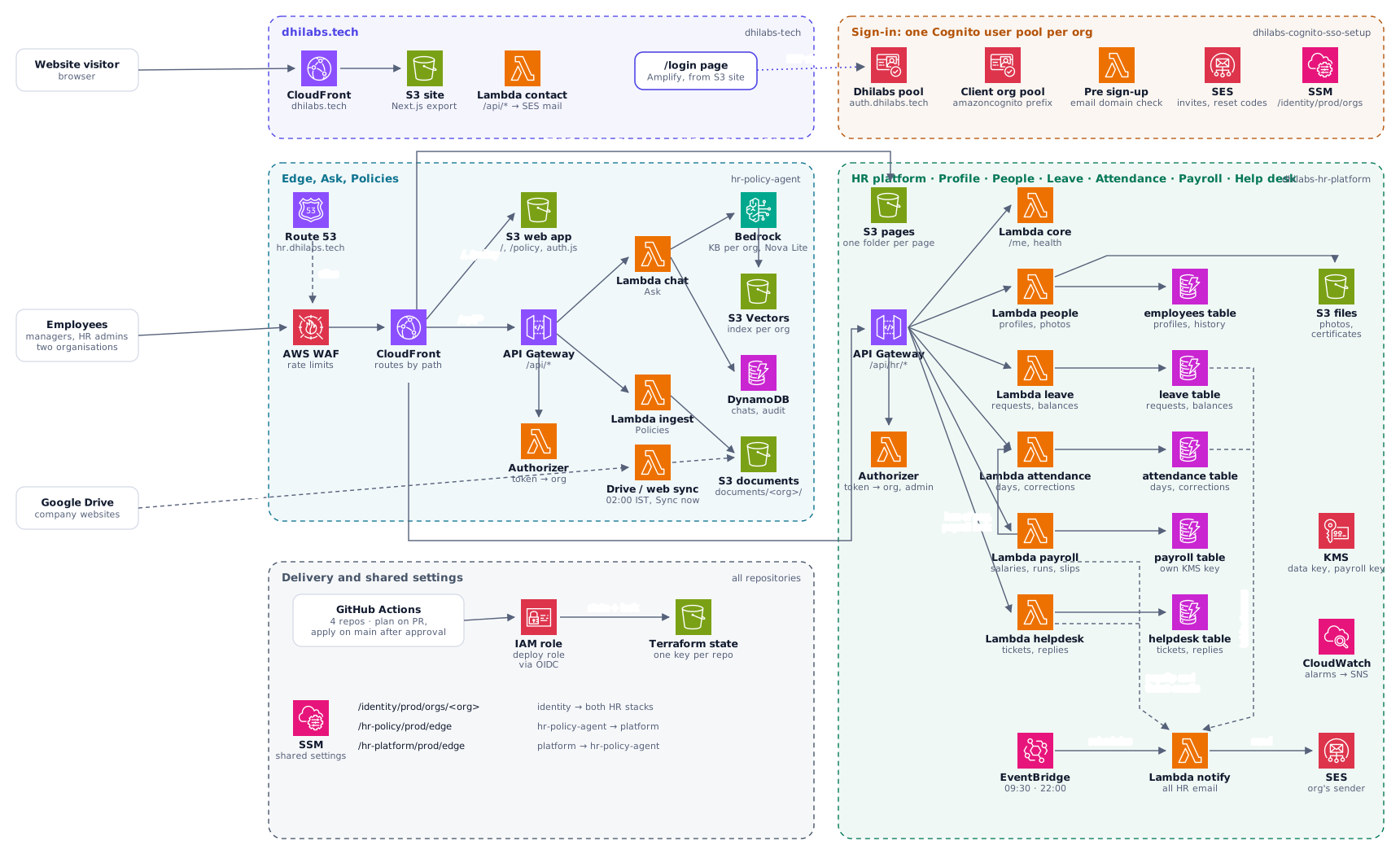
One site, several stacks, no servers
A single CloudFront distribution serves hr.dhilabs.tech and routes each path to the stack that owns it. Solid arrows are requests, dashed arrows are background work and streams, dotted arrows are sign-in.
Workflow
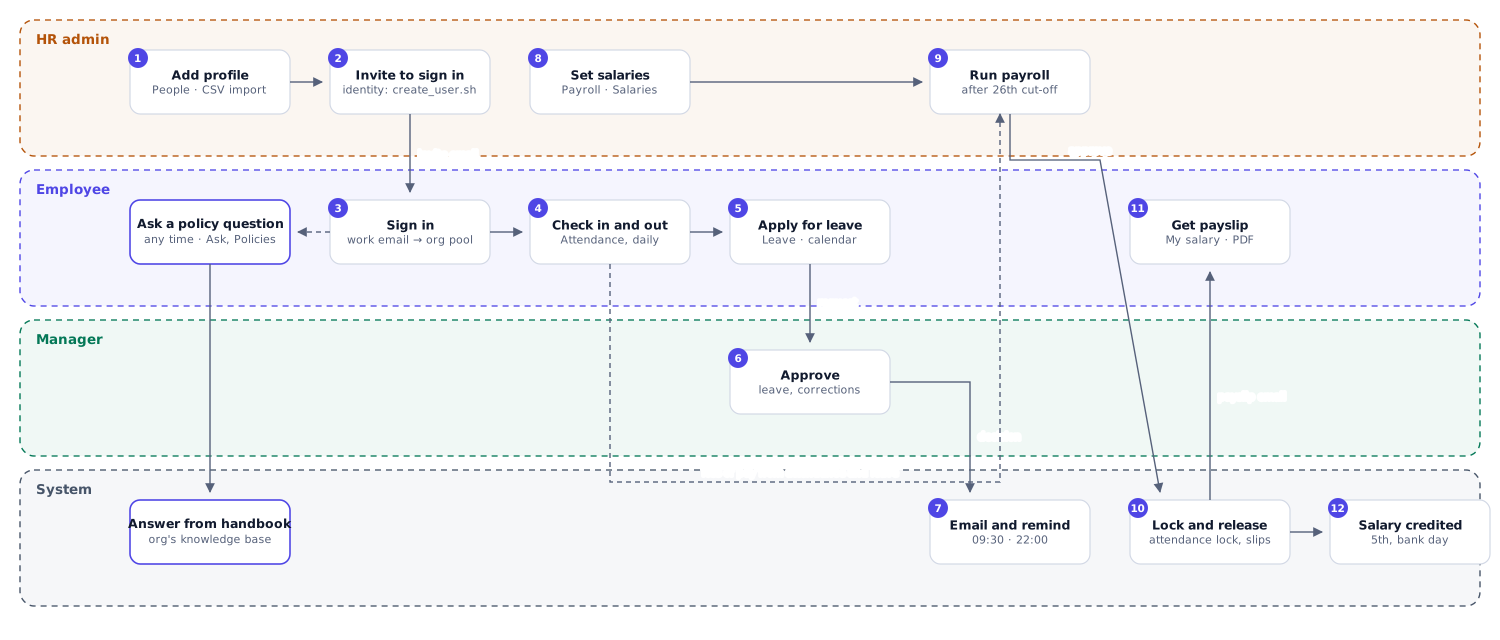
One employee's month, from joining to salary
HR adds the person and invites them; they sign in, check in each day, and apply for leave; managers and HR approve; payroll takes loss of pay from attendance and leave, and approving payroll locks those days and releases payslips.
Module
Sign-in for several organisations
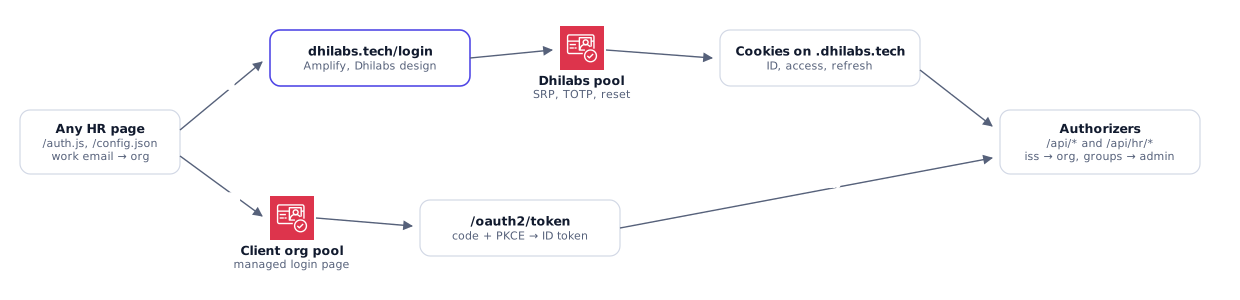
One site, one session for every page. The browser picks the organisation from the work email's domain, but the APIs never trust that choice.
- One Amazon Cognito user pool per organisation, with MFA (TOTP), password reset, and an email-domain check on every new account.
- Our own organisation signs in on a page in the website's design; a client organisation can use Cognito's managed login with code and PKCE.
- A Lambda authorizer verifies each token's signature against the pool that issued it, then passes the organisation, user, and admin rights to the handlers.
Module
Ask: HR answers from the company's own policies
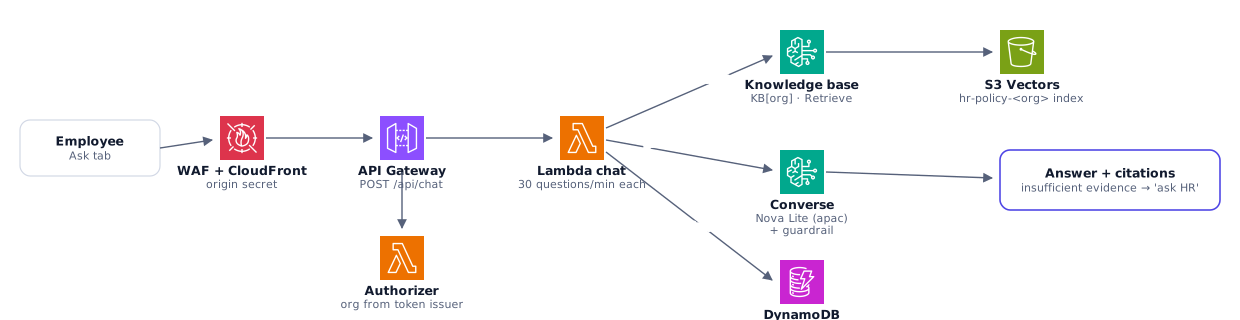
Employees ask in plain words and get an answer drawn only from their organisation's policies, with the documents it used. If the policies do not cover it, the answer says so and points to HR.
- Amazon Bedrock Knowledge Base with an S3 Vectors index per organisation, so one company's handbook never answers another's question.
- Amazon Nova Lite through the Converse API, under a Bedrock guardrail.
- Rate limits per person and at the edge (AWS WAF); every question is kept in an audit log for a year.
Module
Policies: a library that keeps itself current
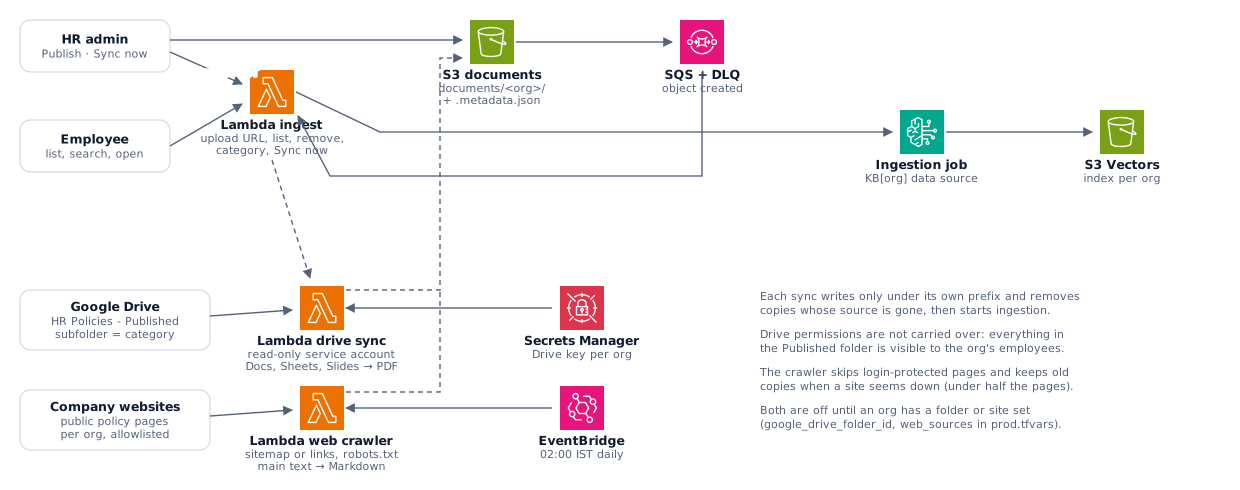
Every document Ask answers from, by category and searchable. Policies arrive three ways and are indexed without anyone pressing a button.
- HR admins upload straight to S3 with a short-lived presigned link.
- A nightly sync copies the organisation's Google Drive folder (Docs, Sheets, and Slides become PDF) with a read-only service account.
- A crawler reads allowlisted public policy pages on the company website, respects robots.txt, and keeps the main text.
- S3 events go through SQS to start an ingestion job; failures land in a dead-letter queue and raise an alarm.
Module
Profile and People
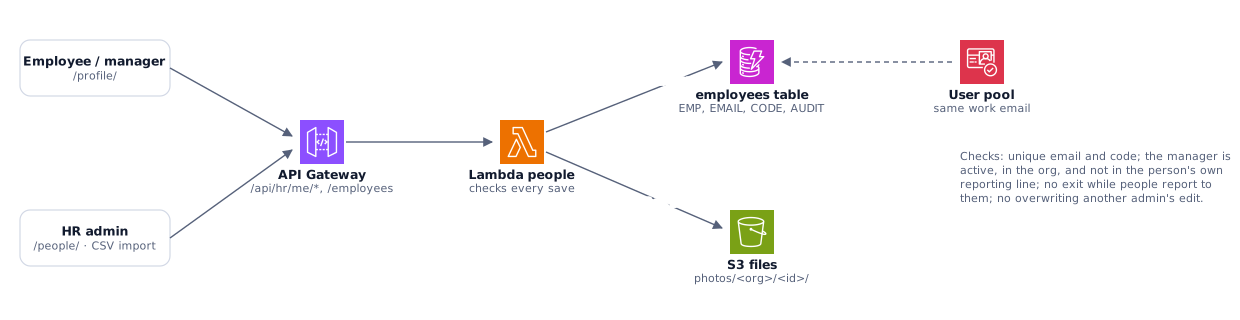
Each person sees their own record and their team. HR keeps the register of everyone: add, edit, import by CSV, photos, and a full change history.
- Checks on every save: unique email and employee code, a manager who is active and not in the person's own reporting line, and no overwriting another admin's edit.
- Managers come from the profiles, so approvals follow the reporting line without extra setup.
Module
Leave with two-step approval
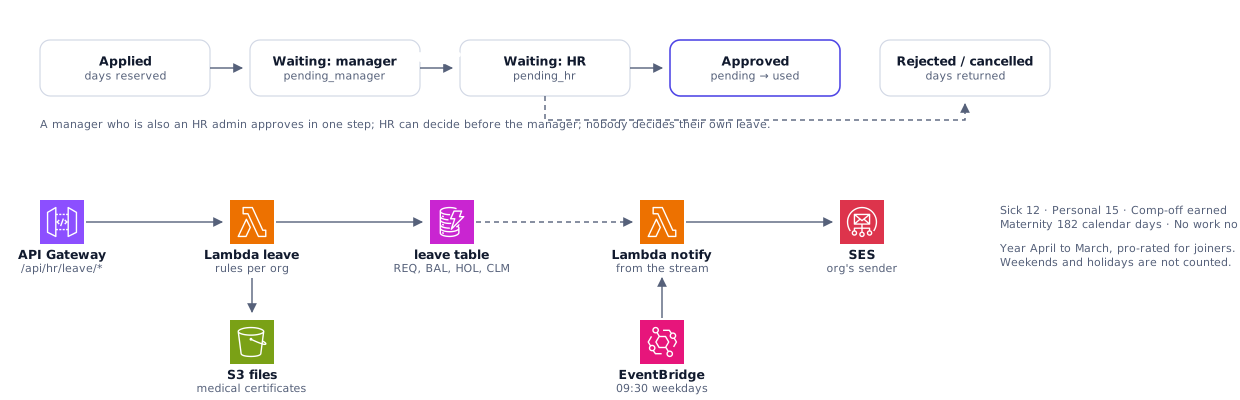
Balances, applying from a calendar, approval by the manager and then HR, comp-off claims, holidays, and medical certificates. Rules are set per organisation.
- Leave year, pro-rating for joiners, weekends and holidays left out of the count.
- Every step emails the people involved, from DynamoDB streams; approvers get a morning reminder for anything waiting.
- Unpaid leave flows into payroll as loss of pay.
Module
Attendance
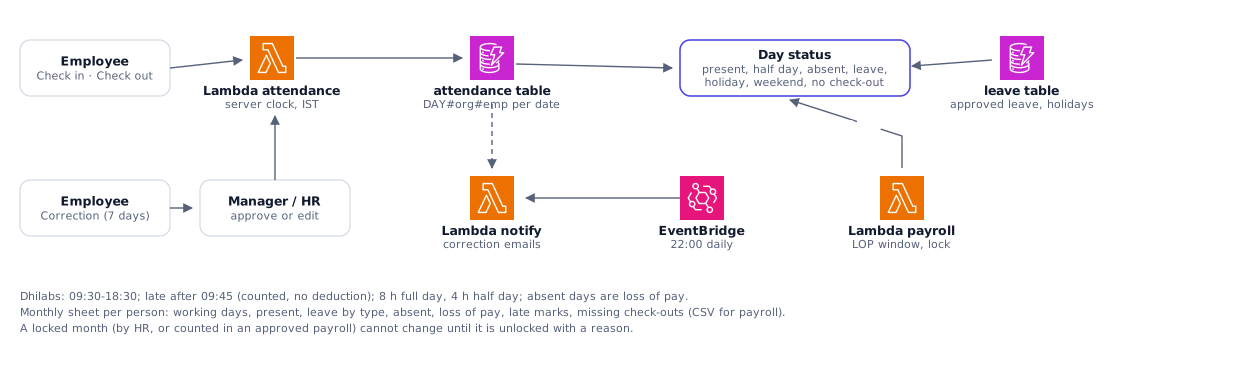
Web check-in and check-out on the server's clock, the month as a calendar, corrections with approval, and the monthly sheet for payroll.
- Each day's status is worked out from punches, approved leave, weekends, and holidays, so fixing an input fixes the status.
- A month counted in an approved payroll is locked until it is reopened with a reason.
Module
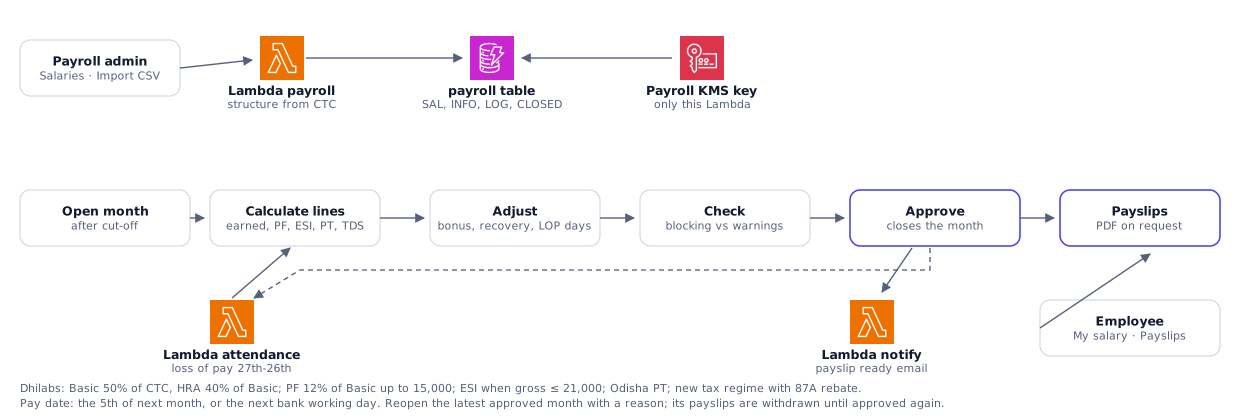
Payroll and payslips
Salary structures, the monthly run with Indian statutory deductions and income tax, approval, payslips, and an access log of every look at salary data.
- PF, ESI, professional tax, and TDS under the new regime; loss of pay comes from attendance and leave.
- Salary data is encrypted with its own KMS key that only the payroll Lambda can use.
- Payslip PDFs are written in pure Python, with no third-party libraries in the Lambda.
- Payroll figures are checked with a chartered accountant before salaries are paid from them.
Module
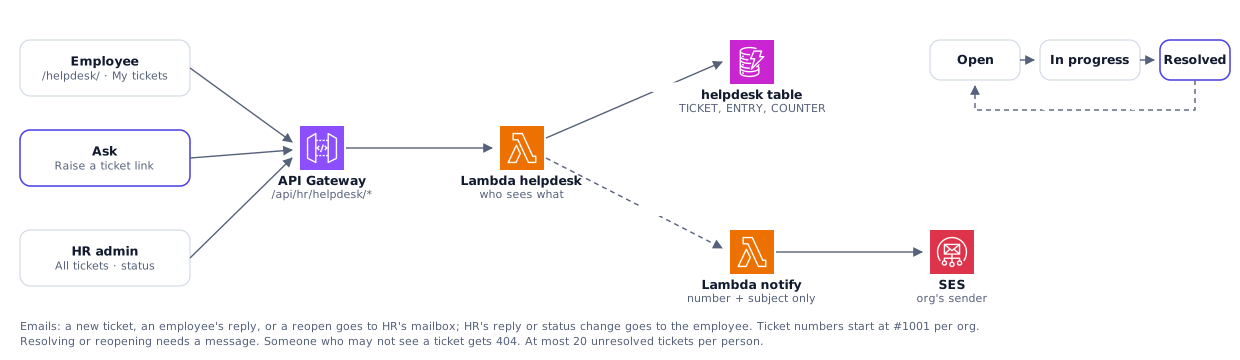
Help desk: tickets to HR
When something about leave, attendance, pay, or a record needs HR, the employee raises a ticket and follows it to the end. When Ask cannot settle a question, its answer offers a ticket with the question filled in.
- Employees see only their own tickets; HR sees every ticket in the organisation, and payroll tickets only the payroll team.
- HR replies and moves each ticket from open to in progress to resolved; the employee can reopen it within 14 days. Every reply and change is kept.
- Emails tell the other side about each change, with the ticket number and subject but never the conversation.
Security
Isolation by design
- AWS WAF in front of the one CloudFront distribution, with rate limits.
- Only CloudFront can reach either API: it adds a secret header that every Lambda checks.
- The organisation is read from the signed token on every request; data is keyed by organisation everywhere.
- DynamoDB, S3, and the vector store are encrypted with customer-managed KMS keys; payroll has its own key.
- Point-in-time recovery on the main tables and deletion protection on the user pools.
- Alarms on errors and dead-letter queues, and budgets that email at 80% forecast and 100% actual.
Delivery
Infrastructure as code, end to end
- Four repositories, each deployed on its own: sign-in, the company website, the site edge with Ask and Policies, and the HR platform.
- Terraform for every resource; GitHub Actions plans on each push and applies after approval on the production environment.
- CI signs in to AWS with OIDC, so no long-lived keys exist anywhere.
- Stacks share settings through SSM Parameter Store, never through each other's state.
AWS cost
What it costs to run
The whole implementation in one AWS account (ap-south-1). Actual figures are from AWS Cost Explorer; monthly figures use AWS list prices for ap-south-1 as of October 2026, in US dollars with 18% GST, at about ₹88 to the dollar.
Billed, September 2026
$2.24
Including $0.34 GST. Live from 26 September.
Running cost today
≈ $16 / month
≈ ₹1,400, almost all of it fixed.
At 200 employees
≈ $34 / month
≈ ₹3,000, about ₹15 per employee.
Fixed monthly cost
Charged whether anyone uses the system or not.
| Item | Price | Per month |
|---|---|---|
| AWS WAF web ACL, 4 rules | $5 per ACL + $1 per rule | $9.00 |
| KMS keys: app data, platform data, payroll | $1 per key | $3.00 |
| Secrets Manager: two origin-check secrets | $0.40 per secret | $0.80 |
| Route 53 hosted zone | $0.50 per zone | $0.50 |
| CloudWatch: 13 alarms, 1 dashboard | 10 alarms and 3 dashboards free | $0.30 |
| Cognito user pools | First 10,000 monthly active users free | $0.00 |
| Company website (S3, CloudFront, contact form) | Within free tiers | $0.00 |
| Fixed, before GST | $13.60 |
Monthly cost as use grows
Assumes each employee asks 10 questions a month, makes about 300 requests (check-ins, pages, approvals), and gets about 10 emails.
| Part | Today | 50 employees | 200 employees | 1,000 employees |
|---|---|---|---|---|
| Fixed (above) | $13.60 | $13.60 | $13.60 | $13.60 |
| Ask: guardrail and Nova Lite, 10 questions per employee | < $0.10 | $3.10 | $12.40 | $62.00 |
| Lambda, API Gateway, DynamoDB, S3, CloudFront, SES, logs | < $0.50 | $1.00 | $3.00 | $12.00 |
| GST 18% | $2.60 | $3.20 | $5.20 | $15.80 |
| Total per month | ≈ $16 | ≈ $21 | ≈ $34 | ≈ $103 |
| In rupees | ≈ ₹1,400 | ≈ ₹1,850 | ≈ ₹3,000 | ≈ ₹9,100 |
- Biggest fixed cost: AWS WAF, two thirds of the fixed bill. It protects every stack behind the one CloudFront distribution.
- Biggest usage cost: the guardrail on each Ask question, about 25 times the model's own cost. Leave, attendance, payroll, and the help desk cost almost nothing per use.
- Beyond 1,000 employees the main change is a higher Bedrock tokens-per-minute quota, not new services.
- Optional extras, off today: warm chat Lambdas (about $11 a month each) to remove the first-question delay.
Stack
Built with
- Amazon Bedrock
- Nova Lite
- S3 Vectors
- Lambda (Python)
- API Gateway
- DynamoDB
- Cognito
- CloudFront
- AWS WAF
- S3
- SQS
- EventBridge
- SES
- KMS
- CloudWatch
- Terraform
- GitHub Actions
Want Dhilabs HR, or something like it, for your business?
We can set up Dhilabs HR for your organisation, or design, build, and run an AI solution of your own on AWS, with the cost worked out before we start. Tell us what your team needs and we will come back with a plan and a monthly estimate.