The problem
A multi-company (multi-tenant) app has one question to answer on every request: which company is this person from? The usual shortcut is to let the page say so, in a header, a URL or a field in local storage. That works until someone changes it. In an HR product the cost of a wrong answer is not a broken page; it is someone else's salary slip.
We set three rules before writing any code:
- The company comes from a signature, never from the browser. Anything the page sends can be edited; a token signed by the company's own identity pool cannot.
- Each company can have its own sign-in rules: email domains, groups, MFA, branding, and later its own single sign-on (Google Workspace, Microsoft Entra, Okta).
- Adding a company is configuration, not code. One entry in a Terraform variable, one deploy.
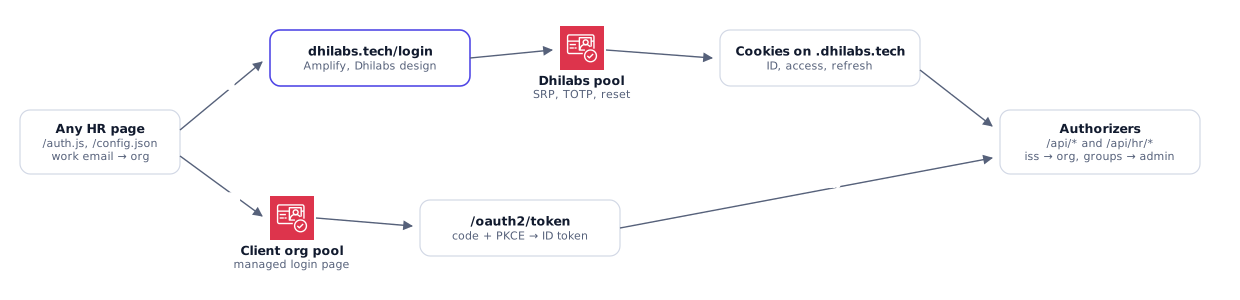
A user pool per organisation
Amazon Cognito lets you put every user in one pool and tag them with a company attribute, or give each company its own pool. We chose a pool per organisation, defined in one Terraform repository that does nothing but identity.
- Isolation by construction. Users, groups, password policy and MFA settings live inside the pool. A group called
adminin one company means nothing in another, so a misconfigured group cannot grant cross-company rights. - Per-company sign-in. Each pool has its own sign-in domain and branding, and can federate to that company's own identity provider later without touching the others.
- The token says who signed it. Every token carries its pool as the issuer (
iss). That one claim, protected by the pool's signature, is how the API knows the company.
Accounts are created by HR, not by self sign-up. A pre sign-up Lambda trigger on every pool rejects any email outside that company's domains, for invited users and for anyone arriving through single sign-on later. A pool for example.com can never hold a gmail.com account, even by mistake.
The browser picks, the API decides
The sign-in page still has to send people to the right pool. It does that from the email domain they type, using a list of organisations it loads with the page:
function orgForEmail(email) {
  const domain = String(email).trim().toLowerCase().split("@")[1] || "";
  const orgs = config?.orgs || [];
  return orgs.find((org) => org.emailDomains.includes(domain))
    || (orgs.length === 1 ? orgs[0] : null);
}
This is a convenience, not a security control. If someone edits the script to pick a different company, they are sent to that company's pool, where they have no account. And if they somehow present a token from their own pool to the API while claiming to be someone else, the API ignores the claim and reads the company from the token's issuer. The comment at the top of that file says it plainly: the API trusts only the pool that signed the token, not this choice.
Checking tokens without a crypto library
Every API call carries the user's ID token. An API Gateway Lambda authorizer checks it before any handler runs. Here is the whole sequence; a token that fails any step is refused and never reaches the code that touches data.
authorizer checks, in order
The awkward part is the signature. Cognito signs tokens with RS256, and the Lambda Python runtime ships without a cryptography library. We could have packaged one, but that means a build step, native wheels for the right architecture, and a dependency to keep patched in the most sensitive function we run. RS256 verification turns out to be short enough to write with the standard library:
SHA256_PREFIX = bytes.fromhex("3031300d060960864801650304020105000420")

def rs256_valid(signing_input, signature, key):
    n, e = key                                   # from the pool's JWKS
    size = (n.bit_length() + 7) // 8
    if len(signature) != size:
        return False
    digest_info = SHA256_PREFIX + hashlib.sha256(signing_input).digest()
    expected = b"\x00\x01" + b"\xff" * (size - len(digest_info) - 3) + b"\x00" + digest_info
    recovered = pow(int.from_bytes(signature, "big"), e, n).to_bytes(size, "big")
    return hmac.compare_digest(recovered, expected)
Raise the signature to the public exponent, and the result must be exactly the padded SHA-256 digest of the header and payload. Comparing the whole padded block, rather than parsing it, avoids a class of known padding bugs, and hmac.compare_digest keeps the comparison constant-time.
Keys, rotation, and not being hammered
The public keys come from each pool's /.well-known/jwks.json. The authorizer caches them per issuer for an hour. When a token names a key id it has not seen (Cognito rotated its keys), it fetches again early, but at most once every five minutes, so a stream of forged tokens with random key ids cannot turn the authorizer into a load generator against Cognito.
What handlers get
A valid token produces a small, trusted context that API Gateway passes to every handler: org, sub (the user), email, groups, and admin. Admin is worked out per company from that company's own admin groups, because group names differ: one company calls it admin, another hr-admin.
From there, isolation is a matter of never using anything else to find data:
- Every table is keyed by organisation; chat history, for example, lives under
USER#<org>#<sub>. - Each organisation has its own Bedrock knowledge base and vector index, and its own folder of policy documents.
- Handlers never read an organisation from the request body or query string.
Settings as a contract between repositories
Identity lives in its own repository and the HR apps in theirs, deployed separately. They meet in one place: a JSON document per organisation in AWS Systems Manager Parameter Store, which the identity repository writes and every app reads when it deploys.
{
  "org": "example",
  "display_name": "Example Ltd",
  "user_pool_id": "<pool id>",
  "issuer": "https://cognito-idp.ap-south-1.amazonaws.com/<pool id>",
  "login_url": null,
  "email_domains": ["example.com"],
  "groups": ["employee", "manager", "hr-admin"],
  "clients": { "hr-policy": "<app client id>" }
}
The authorizer is configured from these documents: issuer to organisation, the expected client, the allowed domains and the admin groups. Adding a company is one entry in the identity repository's variables, a deploy, then the company's key added to the app's list. No code changes.
Our own sign-in page
Cognito's managed sign-in page cannot change its wording or layout, so for our own organisation we built one at dhilabs.tech/login, in the website's design. It uses AWS Amplify against the same pool: sign-in, the new password on a first sign-in, authenticator-app codes, and forgotten passwords.
- An app sends people to
/login?app=<app>&return_to=<url>. The page signs in with that app's own client, so the token's audience is what that app's API expects. - The session is left in cookies on the parent domain, where the HR site on its subdomain reads and refreshes it. One sign-in, every page.
return_tomust start with one of that app's registered addresses; anything else goes to the app's home page, so the sign-in page cannot be used to bounce people to a phishing site.
Other organisations use Cognito's page with the authorization code flow and PKCE. The API does not care which page was used.
What we learned
- Swapping an authorizer needs two deploys. Terraform deleted the old API Gateway authorizer before moving the routes off it, and API Gateway refused with a 409 because it was still in use. Keep the old one in the configuration for one apply, then remove it.
- Importing a live pool has sharp edges. Our first pool existed before this design. A pool's name forces a replacement in Terraform, so it kept its old name; and setting
generate_secreton an imported app client would replace the client, and with it every token's audience. - Two APIs, two copies of the authorizer. The policy assistant and the HR platform are separate stacks, each with its own authorizer. They are identical copies kept in step by hand. A shared package is the obvious next step.
- Terraform hides SSM values. Every
aws_ssm_parametervalue is marked sensitive, which hides diffs and breaks outputs. Reading the settings withjsondecode(nonsensitive(...))fixed both.
When we would do it differently
A pool per organisation suits a product with a handful to a few dozen companies, each wanting its own sign-in rules. With hundreds of small tenants, managing hundreds of pools, domains and app clients becomes the work, and a single shared pool with a signed tenant claim (added by a pre token generation trigger) is the better trade. The rule would not change: the tenant still comes from the signature, never from the browser.
For the rest of the platform (policy answers on Bedrock, leave, attendance, payroll and the AWS bill), read the full architecture of Dhilabs HR.